Turn Your RimWorld Loading Nightmare Into a 2-Minute Coffee Break
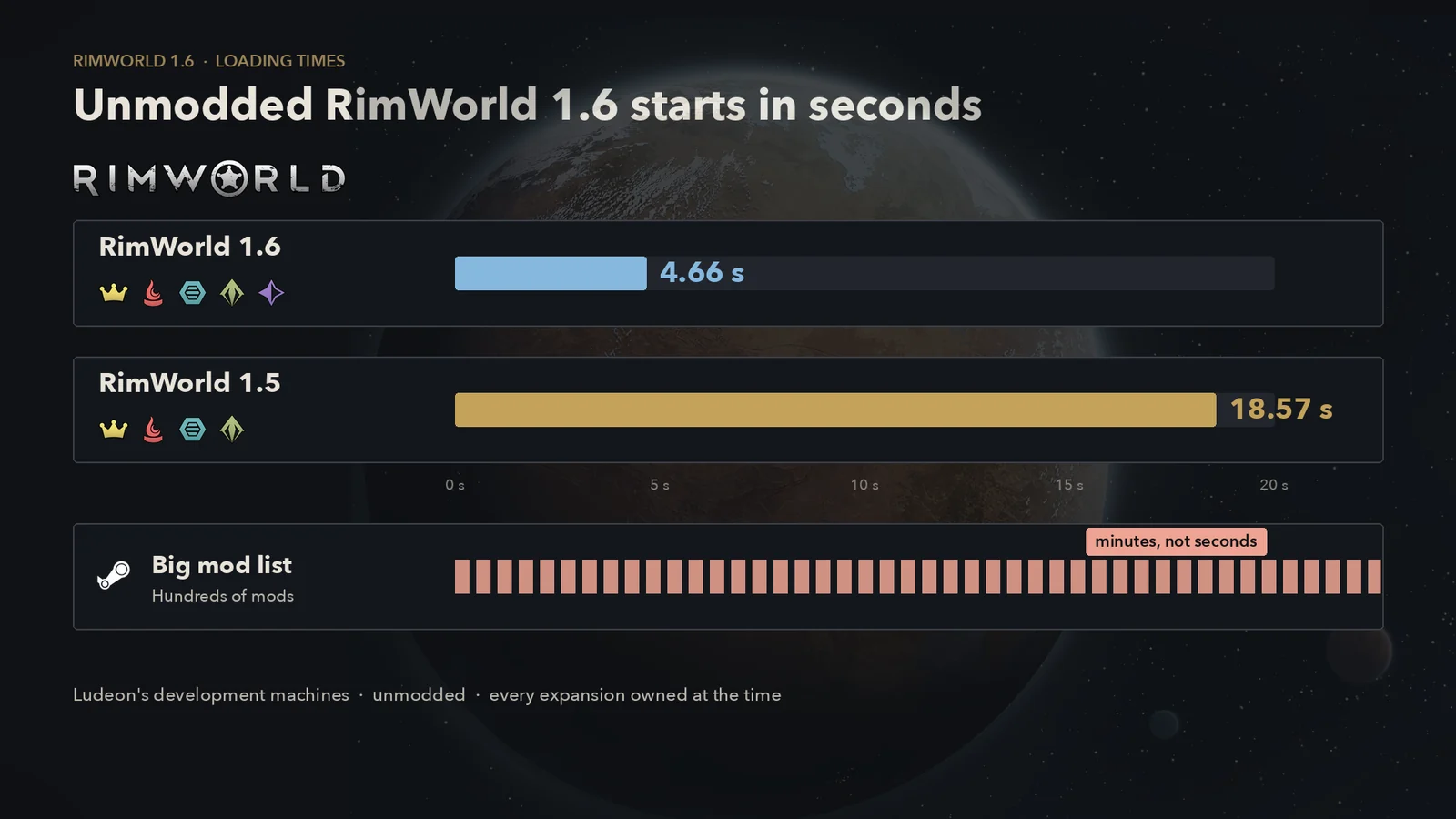
Unmodded RimWorld 1.6 hit the main menu in 4.66 seconds on Ludeon's development machines with every expansion installed, down from 18.57 seconds in 1.5. A modded game that takes minutes is usually waiting on the mod list: XML patches still run one at a time in load order, and PNG textures get decoded (and usually compressed) again every launch. Time a cold start, read the slow mods in the game's own log, then add one 1.6-tagged startup mod. RocketMan and Performance Fish have no official 1.6 builds. Lag at speed 3 is a different clock with different fixes.
PC 1.6.4871 · All five expansions · Modded and unmodded · Updated October 7, 2026
Watch on Open.Video · English audio
How long should RimWorld take to load in 1.6?
Ludeon published one official benchmark. In the 1.6 announcement of June 11, 2025, and again in the full changelog, they wrote that 1.5 launched in 18.57 seconds with all expansions on their development machines, and that 1.6 launched in 4.66 seconds with one more expansion (Odyssey) installed. Both posts note that your startup can differ because of bottlenecks in your own PC or mods.
The changelog points at a new XML loader that "loads defs roughly 40% faster". Update 1.6.4566 (August 28, 2025) added DDS texture loading for mods and a custom atlas packer that Ludeon said lets the game start slightly faster while using less memory. Neither 1.6.4630 (October 2025) nor 1.6.4850 (June 2026) mentions launch time.
4.66 seconds is Ludeon's hardware, not a pass mark. An older CPU or a hard drive will take longer. If an unmodded game takes several minutes, check the install, the disk, and background software such as antivirus first.
What big mod lists take
There is no standard modded benchmark. The useful numbers are the timings two 1.6 startup-mod authors put on their Workshop pages, each from a single machine, and they measure different things:
| Source | Mod list | What was compared | Result |
|---|---|---|---|
| Hyperdrive's author | 250 mods | Cold start without Hyperdrive, then with it | 5:14 → 2:32 |
| DefLoadCache's author | 414 mods, Combat Extended milsim list | DefLoadCache installed: first launch, which builds the cache, then later launches with the same list | about 9:10 → about 2:40 |
Treat those as a shape, not a promise. DefLoadCache's 9:10 already includes the mod, plus a few seconds to save its cache. A few hundred mods taking several minutes is normal on 1.6. Patch-heavy lists cost more than the raw mod count suggests. A faster CPU and an SSD still help more than anything else you can buy.
Menu, save, or speed 3: which clock is slow?
"Speed up RimWorld" covers three different waits. Diagnose each one separately. Some mods work on more than one (Missile Girl has a startup cache and tick optimizations), but a fix for one wait does not automatically help the others.
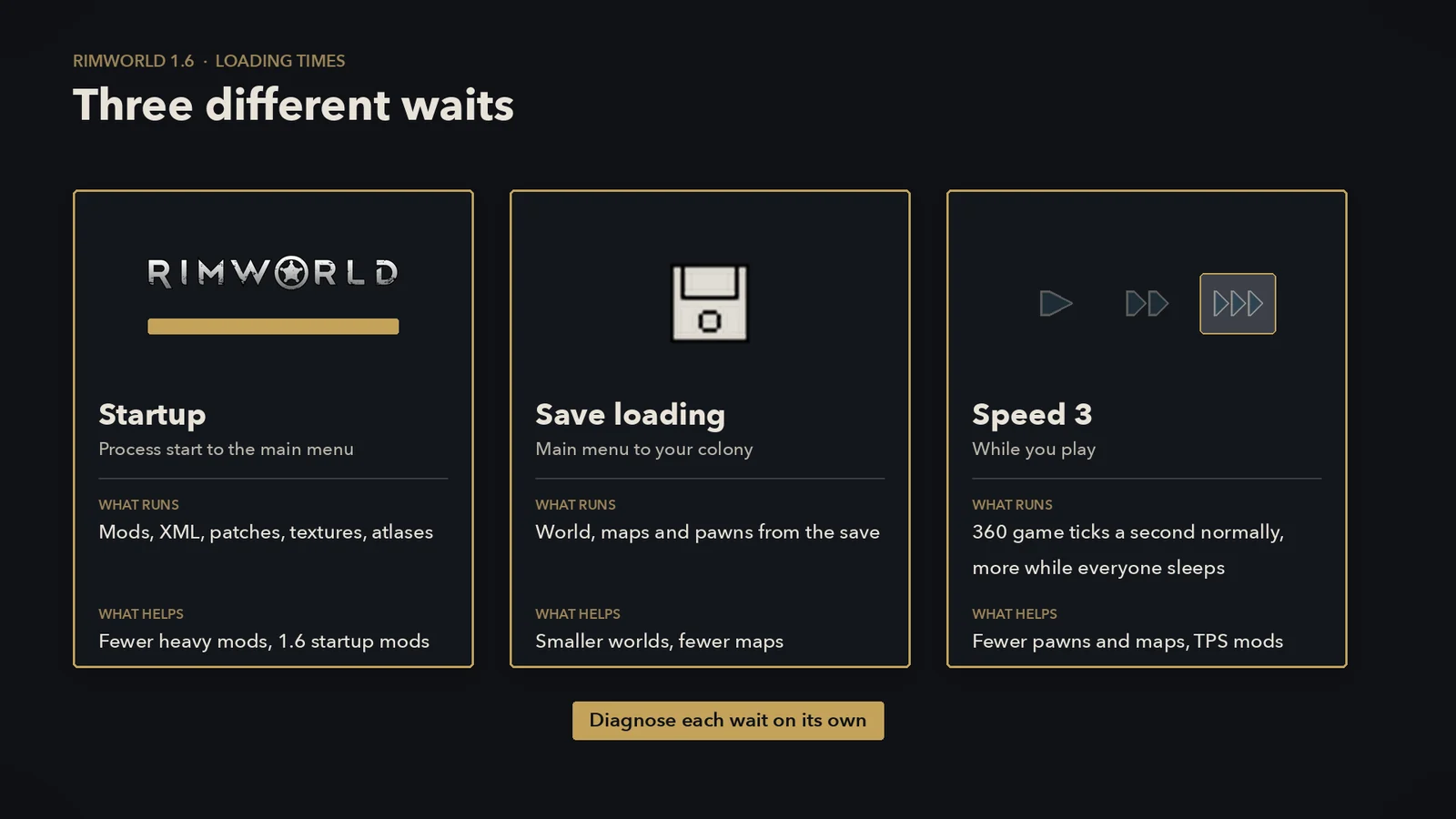
| Symptom | What the game is doing | First check | Go to |
|---|---|---|---|
| Long wait before the main menu | Startup: mods, XML, patches, textures, atlases | Time two launches in a row | Time it |
| Main menu is quick, a save takes ages | Reading the save and rebuilding the world and maps | Mod-mismatch prompt, world coverage, number of maps | Slow saves |
| The game runs, but speed 3 crawls | Ticks: 360 game updates a second normally, more while everyone sleeps | Turn on the TPS counter | Speed 3 lag |
| Loading never finishes or crashes | An error, a hang, or a mod conflict | Last lines of Player.log | Stuck |
Symptom checker
Pick what is slow and roughly how many mods you run. The checker points at the likely cause and the next two or three things to try.
What RimWorld does on the loading screen
Startup runs in a fixed order. Once you know the order, you can tell which part of your list is expensive.
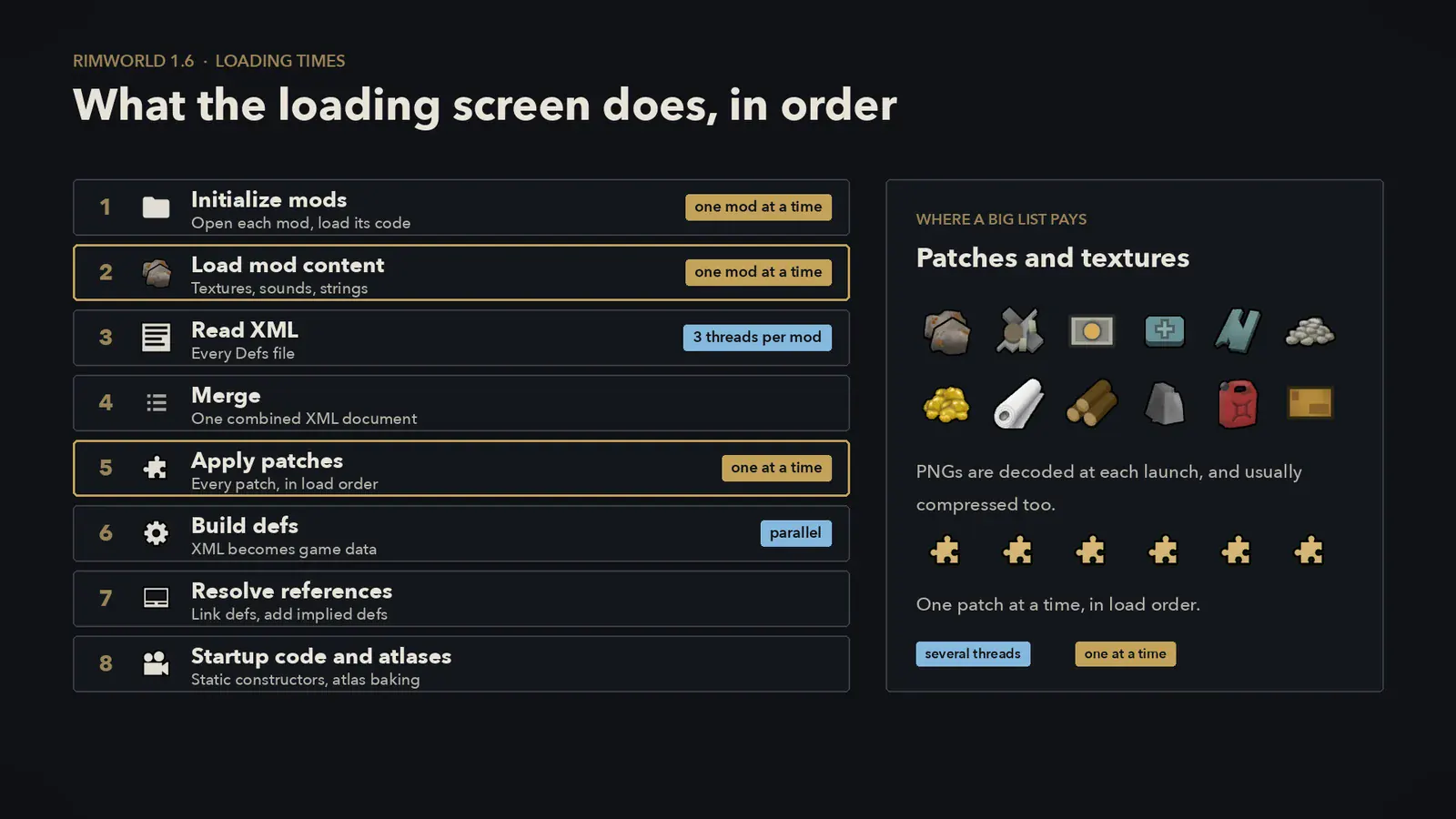
- Initialize mods. Each active mod's folder is opened and its code (DLLs) loaded. A mod whose folder is missing is switched off with a warning.
- Load mod content. Textures, sounds and translation strings, mod by mod in load order. Big texture packs pay here.
- Read XML. Every Defs file. Inside one mod the files are read on three threads, two helpers plus the main one, but the mods still take turns.
- Merge everything into one XML document.
- Apply patches. Every patch operation from every mod, in load order, one at a time. Nothing in this step runs in parallel, which is why patch-heavy lists such as Combat Extended with its patch packs dominate.
- Build defs. The XML becomes game data. Copying defs into the databases and the final error check run in parallel by def type.
- Resolve references and generate implied defs such as blueprints and frames.
- Initializing. The loading text changes, then mods' startup code (static constructors) runs, textures are baked into atlases, and memory is cleaned up.
"RimWorld loads on one core" is only half true in 1.6. File reading and def checks are threaded; patching and per-mod content loading still go one at a time.
Time your startup before you change anything
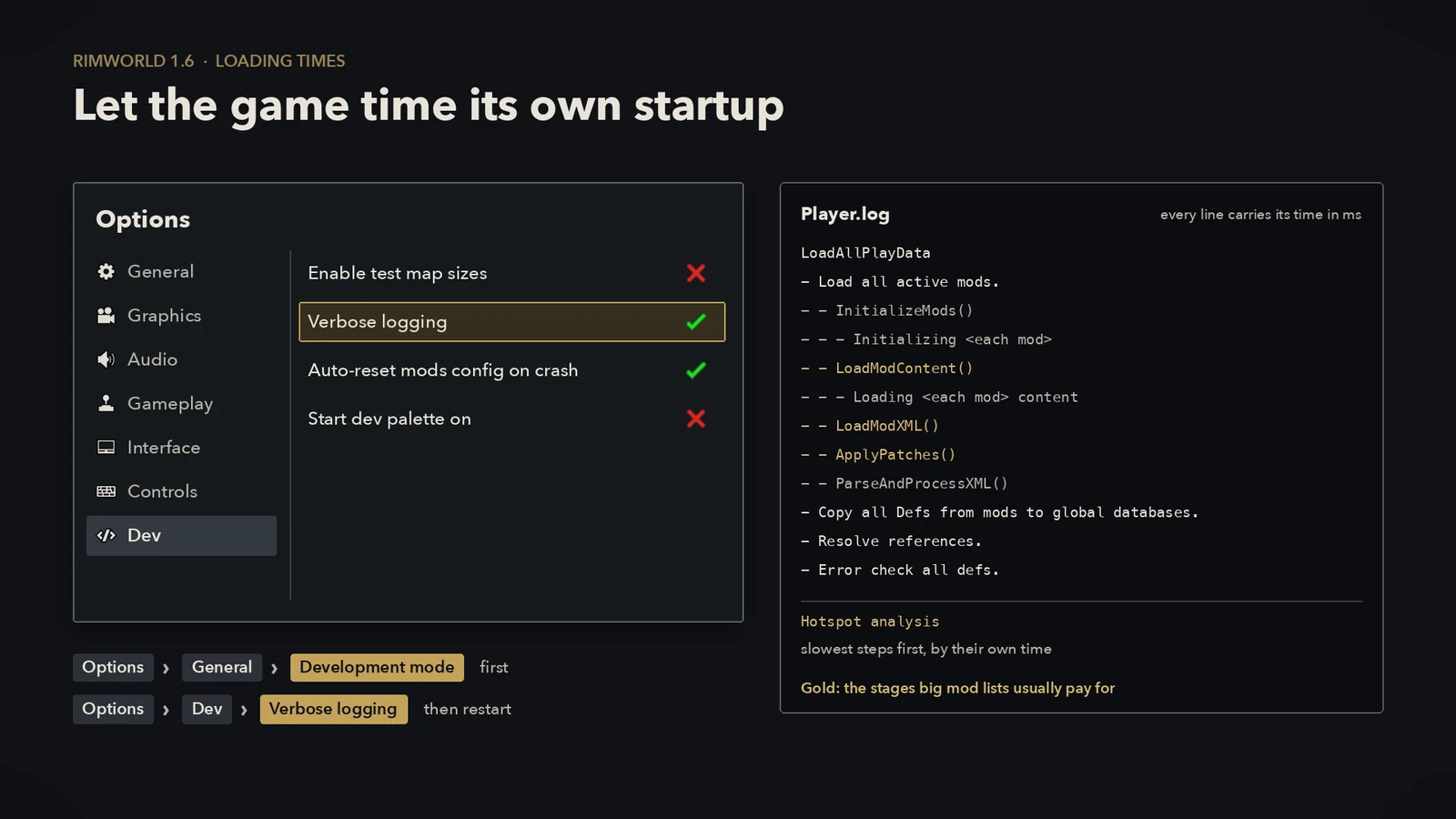
RimWorld can time its own startup. With verbose logging on, the log breaks down every stage and every mod in milliseconds. Use it before you install anything, then again after each change.
- Note your build. The version is in the top-left corner of the main menu. Compare times only on the same build.
- Turn on the timer. Options → General → tick Development mode. A Dev tab appears: Options → Dev → tick Verbose logging. Restart the game.
- Read the breakdown. After the main menu appears, open Player.log and search for
LoadAllPlayData. The timings are written in one block when each timed step finishes, not while it runs. Under it you'll find every stage with its time, including one line per mod forInitializing,Loading … contentand XML loading. A "Hotspot analysis" list follows, sorted by the time each step took on its own. Static constructors and atlas baking print as separate entries a little later. - Launch twice. Start again without touching the list. The gap between the two runs is what the disk cache and any caching mods save you.
- Change one thing, then time it again. One mod removed or one startup mod added per test. Turn verbose logging off when you're done.
Player.log lives here:
- Windows:
%USERPROFILE%\AppData\LocalLow\Ludeon Studios\RimWorld by Ludeon Studios\Player.log - macOS:
~/Library/Logs/Ludeon Studios/RimWorld by Ludeon Studios/Player.log - Linux and Steam Deck (native):
~/.config/unity3d/Ludeon Studios/RimWorld by Ludeon Studios/Player.log
Prefer clicking over reading logs? Loading Progress (1.6) shows each stage live. Turn on its impact tracking in the mod's settings, then click the loading-time summary in the bottom-right of the main menu for a sortable per-mod breakdown. It keeps launch history, records the stage a crashed launch stopped at, and can export an HTML report.
Fixes to try before another performance mod
- Remove what the log blames. A handful of mods usually take most of the time. Check the top of the hotspot list or Loading Progress first.
- Fix startup errors. Red errors on load mean a mod is broken or outdated. Mods built for older versions are the usual cause. Deal with those before you measure anything else.
- Stop reordering between launches. DefLoadCache rebuilds when you add, remove, reorder or update mods, so a reshuffle turns a fast start back into a slow one.
- Put the game on an SSD. Startup reads thousands of small files. Hyperdrive's author also warns that parallel loading can be slower on a hard drive.
- Check antivirus on Windows. A real-time scanner that inspects every file the game opens adds time on big lists. If you exclude folders, keep it to the RimWorld install and Workshop folders, and only if you trust what you've installed.
- Watch memory while it loads. If Task Manager or Activity Monitor shows memory full and the disk busy, the PC is swapping. Fewer texture mods or more RAM fixes that. A bigger Windows page file can stop out-of-memory crashes, but swapping is slow either way.
- Leave texture compression on. Options → Graphics → Texture compression is on by default. Turning it off uses much more video memory, and the game's own tooltip says to keep it on with texture-heavy mods.
If you load a save made with a different mod list and click Load mod list from save, the game restarts and runs the whole startup again with that list. On a big list that's a full reload, and caching mods may have to build a cache for that list first.
Textures: PNG, DDS, and why big texture mods cost minutes
Every PNG a mod ships is decoded and given mipmaps again at each launch. With Texture compression on (the default), it is also compressed when both sides are a multiple of 4 pixels, which covers most textures. A DDS file is already in the format the graphics card uses, so the game maps it from disk and hands it over as-is.
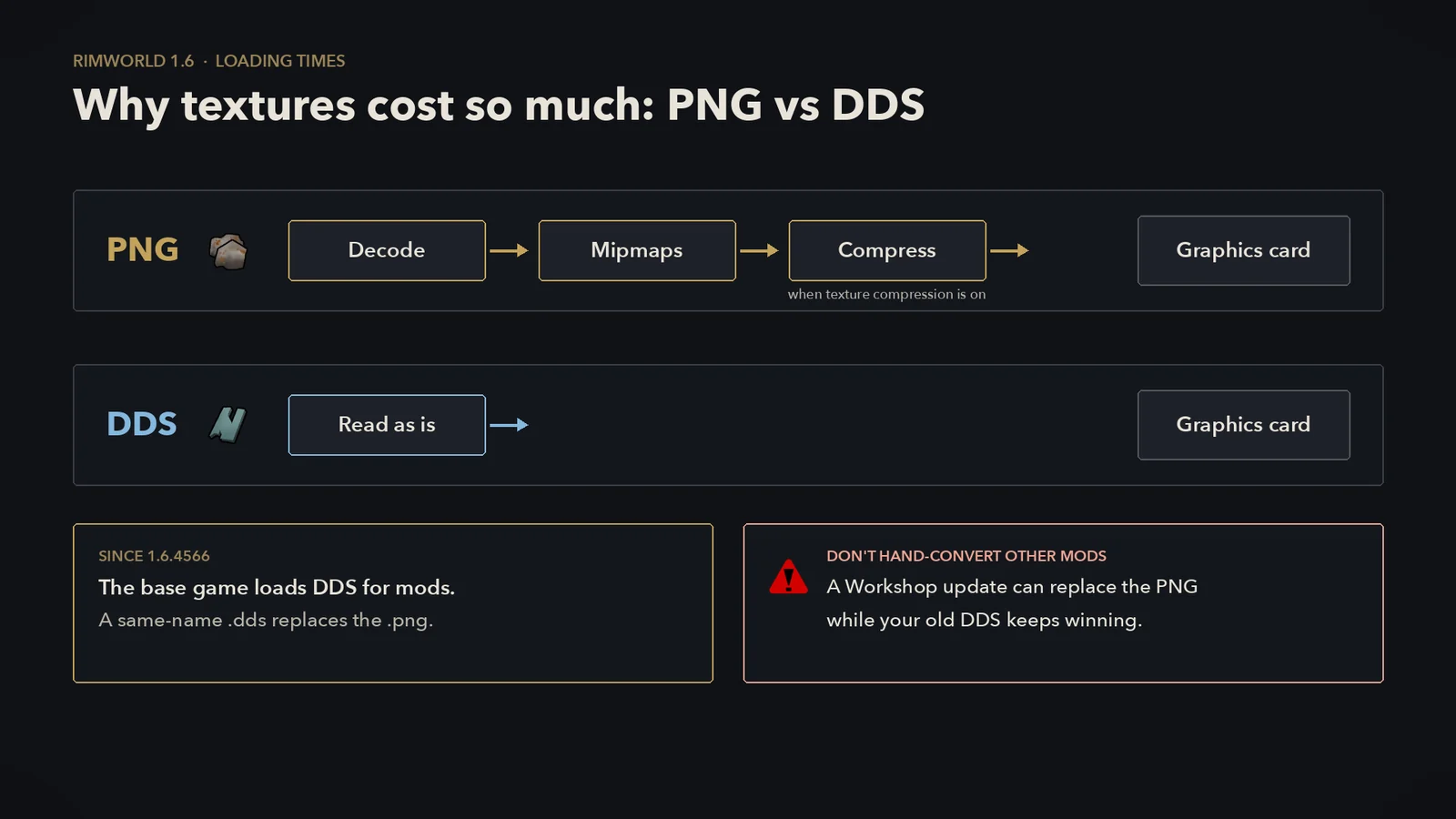
- DDS is vanilla now. Since 1.6.4566 the base game loads DDS for mods and skips a PNG with the same name. You no longer need a separate mod just to read DDS.
- Sizes matter. Textures that aren't a power of two, or are smaller than 4 pixels, get fewer mipmaps and take a slower path. With verbose logging on, the game logs a warning for each one.
- Where compression runs. On the Windows build, PNG compression runs on the graphics card only if it supports compute shaders, has more than 5,000 MB of video memory and isn't integrated graphics. The
-disable-compute-shaderslaunch option turns that off. Everything else, including every Mac, compresses on the CPU, which is where DDS saves the most.
Should you convert mods to DDS yourself?
Hand-converting other people's mods is fragile. A Workshop update can replace a PNG while your old DDS stays in the folder; because the game prefers the DDS, you keep seeing the old texture. If you want DDS, use a tool that tracks changes:
- Mod authors shipping DDS is the clean fix. Ludeon added DDS loading so they could.
- Image Opt decodes PNGs on several threads and can keep DDS copies that regenerate when a mod's texture changes. Its page says it only supports 64-bit Windows. With Faster Game Loading, use the Image Opt fork and load it after FGL.
- Faster Game Loading's Downscale textures tool writes smaller copies of huge textures into its own cache and never edits mod files. It stands aside if Graphics Settings+ is installed.
- RimSort, the mod manager, also has a texture optimizer that writes DDS files.
Startup mods that are current on 1.6
Tags and update dates below are from the Steam Workshop as of October 7, 2026. Check them again before you subscribe. This corner of the Workshop moves fast.
| Mod | What it speeds up | Version tag | Last update | Load order and notes |
|---|---|---|---|---|
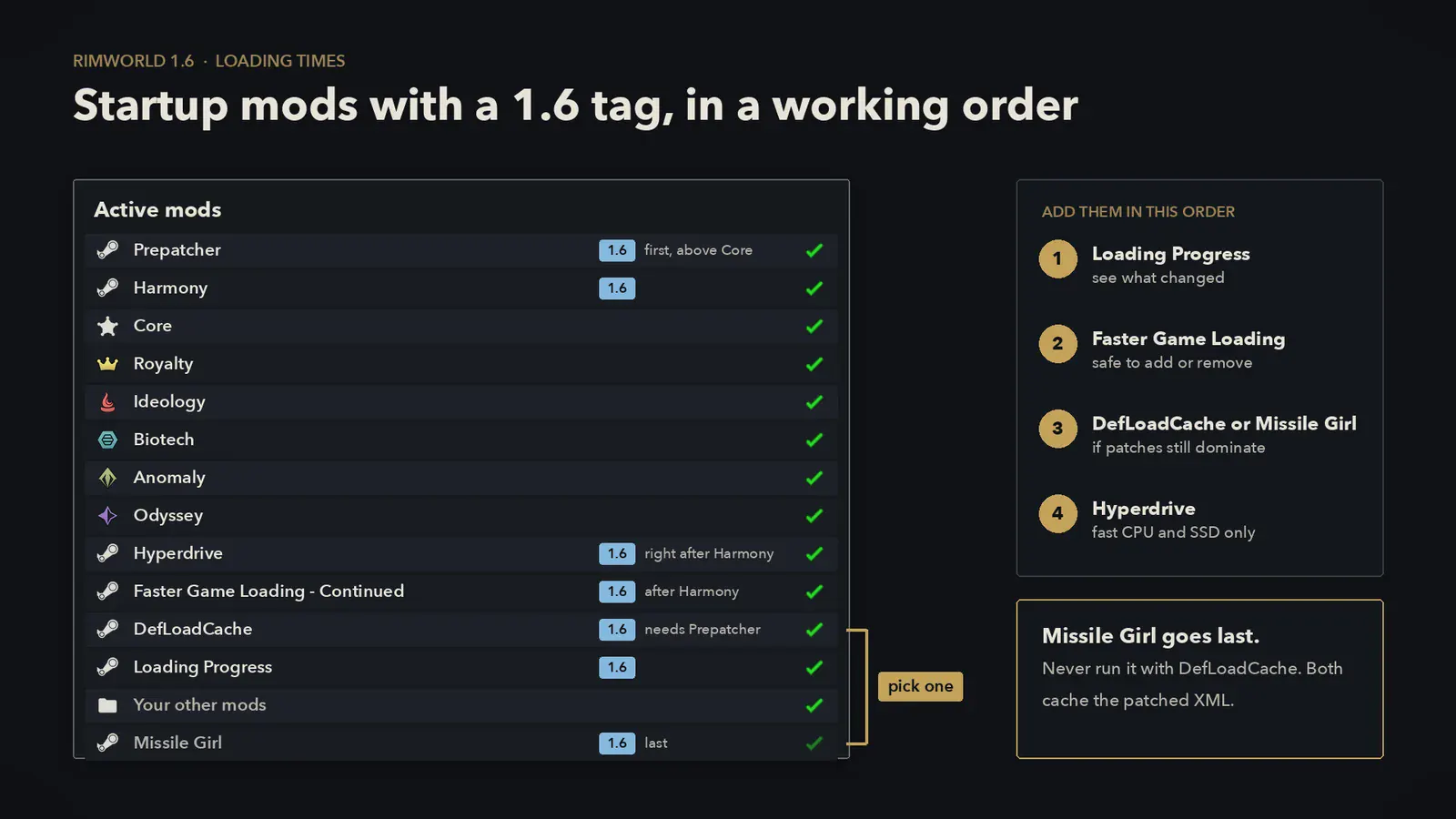
| Faster Game Loading - Continued | Startup: loads mod content early, preloads XML on several cores, caches type lookups, trims atlases | 1.6 | Oct 2, 2026 | After Harmony. Defaults are fine. Restart after changing its settings. |
| Hyperdrive | Startup: loads mods' XML in parallel, indexes patch matching, warms texture files | 1.6 | Jun 9, 2026 | Right after Harmony. Can be slower on a weak CPU or a hard drive. Its page lists a crash with Yet Another Optimizer's fast patch option; check the current notes before combining them. |
| DefLoadCache | Repeat launches: saves the patched XML and skips reading and patching next time | 1.6 | Apr 13, 2026 | After Prepatcher and Harmony (both required). Not with Missile Girl. |
| Missile Girl | Repeat launches (def cache) plus TPS: stat caching, alert throttling | 1.6 | Sep 30, 2026 | Last in the list. Maintained fork of RocketMan. Not with DefLoadCache. |
| Loading Progress | Nothing. Shows stages and per-mod cost | 1.6 | Oct 3, 2026 | Impact tracking is off until you enable it. Conflicts with RimThemes and Startup Impact Continued. |
| Prepatcher | Nothing on its own. A library, plus the Prestarter mod manager (press Space while loading) | 1.4 to 1.6 | Feb 4, 2026 | First, above Core. Can stand in for Harmony. |
| Graphics Settings+ | Texture sharpness, per-mod video memory readout, DDS loading | 1.1 to 1.6 | Jul 26, 2025 | After framework mods. Its DDS loading is now in vanilla too. |
Which to add, in order
- Loading Progress, so you can see what changed.
- Faster Game Loading - Continued. A low-risk first step: its author says it can be added or removed at any time and lists compatibility with the others here.
- DefLoadCache or Missile Girl, if patches still take the biggest share and you don't change your list often. DefLoadCache only caches the XML. Missile Girl also changes how stats, alerts and other systems update, which is more to go wrong but also helps TPS.
- Hyperdrive, on a fast multi-core CPU with an SSD, if the cold start is what bothers you. FGL's author says the two cooperate: FGL leaves Defs XML loading to Hyperdrive.
Time every step. If a mod does not make your launch faster, remove it. A startup mod that saves nothing is one more thing that can break after an update.
Popular mods that won't shorten the loading screen
- RocketMan. Workshop tags 1.2 to 1.5, last updated April 22, 2024. Its def cache was a real loading trick on 1.4 and 1.5. On 1.6, use Missile Girl, its fork, if you want the same features.
- Performance Fish. No 1.6 release. The GitHub repository's About.xml lists 1.4 and 1.5, the last push was March 2025, and the "Where is 1.6?" issue opened in February 2026 is still open. Unofficial 1.6 forks exist; they're not the author's builds, and the reports about them measure frame rate, not startup.
- Performance Optimizer (1.6) speeds up play. It caches and throttles game methods and can hide some UI. It doesn't touch loading.
- Dubs Performance Analyzer (1.6) measures tick and frame cost while its window is open. A diagnostic tool for speed 3, not a fix.
- Old loading mods with no 1.6 tag. If a mod's tags stop at 1.5, leave it out. Old loader patches are a common cause of hangs.
Still building a list from scratch? The mods and mod managers guide covers installing and sorting.
When the save is the slow part
If the main menu arrives quickly but a save takes ages, startup mods will not help. Faster Game Loading, Hyperdrive and DefLoadCache all say they do not touch saves.
- Time the load. Verbose logging also profiles save loading. Search Player.log for
Loading game from file. Loading Progress shows a progress window for save loads too. - Watch for the mod-mismatch prompt. Load mod list from save restarts the game with that list, so you sit through startup again. Load anyway keeps your current list.
- World coverage counts. 1.6.4566 cut the time to load a 100% coverage world save and generated those worlds about 40% faster, but a bigger world is still more to read. For a new colony on a slow PC, pick a smaller coverage.
- Restart after long sessions. 1.6 fixed several memory leaks that slowed down long sessions with frequent reloads. If reloads still get slower over an evening, a fresh launch clears it.
Speed 3 lag is a tick-rate problem
At speed 1 the game runs 60 ticks a second. Speed 2 aims for three times that, speed 3 for six times: 360 ticks a second. Speed 3 doubles to ×12 (720 ticks a second) when no free colonist on any map is awake, whether asleep or unconscious, and no home map is in danger. It goes to ×18 (1,080) when no map exists at all, for example while every colonist is away in caravans. Speed 4, ×15 normally and up to ×150 with no maps, only exists in Development mode.
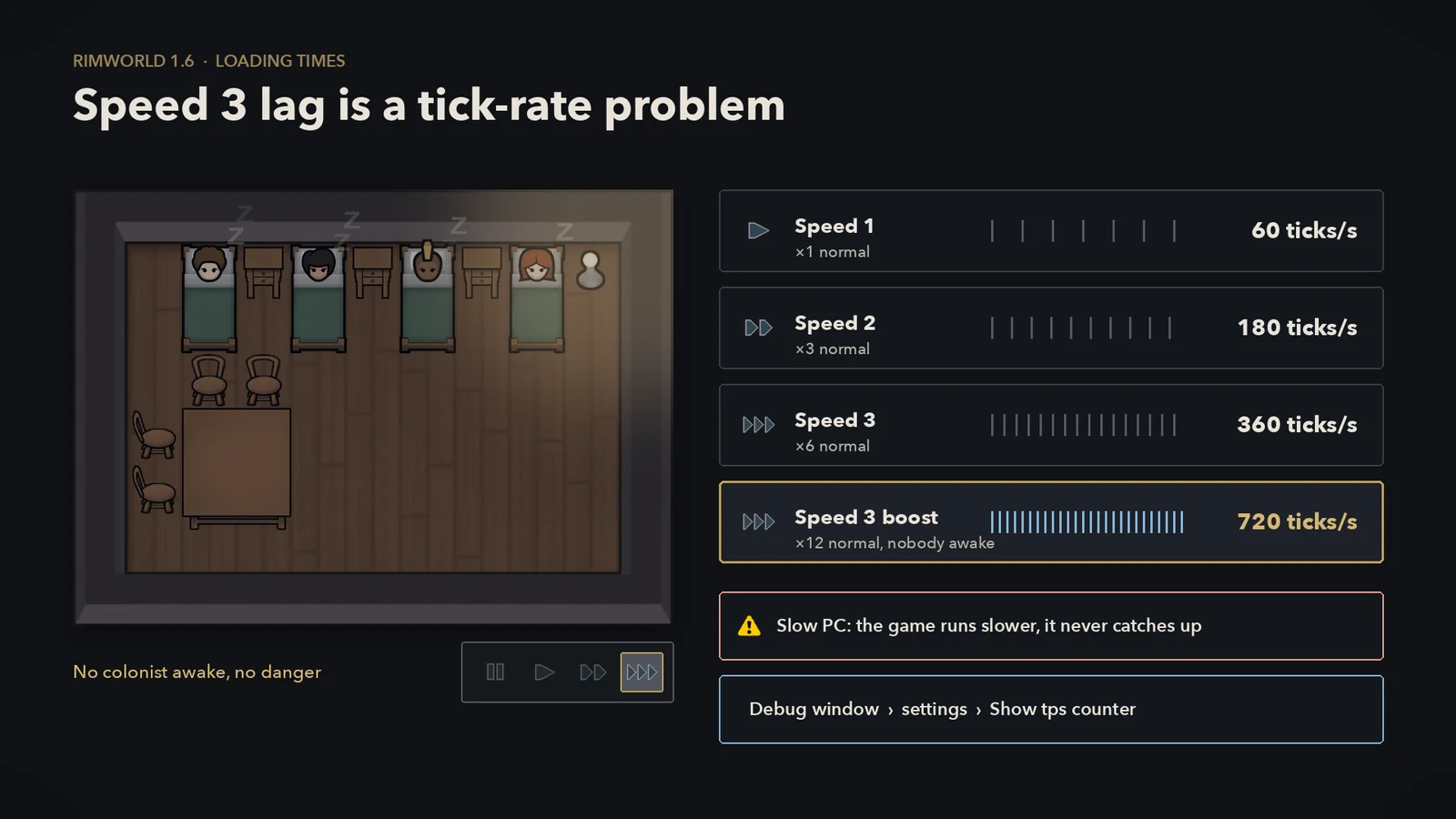
If your PC cannot keep up, the game does not catch up later. It stops ticking after about 45 milliseconds of work in each frame and drops the rest, so the colony simply runs slower than the target. At 360 ticks a second, each tick gets under 2.8 milliseconds before the frame is drawn.
Measure it
Turn on Development mode, open the debug window from the dev toolbar, open the settings tab, and enable Show tps counter. It shows ticks per second and milliseconds per tick next to the time controls. For a per-system breakdown, use Dubs Performance Analyzer.
What 1.6 already does
- Ludeon measured 20 to 30% more TPS in late-game colonies on an example machine.
- Pathfinding is fully multithreaded and batched, and lighting is multithreaded too.
- Things you can see update their interval logic every 1 to 5 ticks depending on zoom. Off camera, on another map, or while you're on the world view, that drops to every 15 ticks.
- Caravan foraging, egg-laying, alerts, hauling and animal pens were optimized, and several memory leaks fixed.
What still eats ticks is the usual list: lots of pawns and animals, several maps at once, and mods that run code every tick. Missile Girl and Performance Optimizer are the TPS mods with 1.6 tags. In multiplayer, tick-throttling mods can cause desyncs; see the multiplayer sync guide. For why pawns take the routes they do, see how RimWorld pathfinding works.
Stuck, not responding, or fast only the second time
- "Not responding" during startup can just mean a long step is running. Faster Game Loading's author says a brief not-responding state is normal with it, and that sounds can stay silent for a moment after the main menu appears.
- Telling a hang from a slow load isn't possible from a quiet log alone, because the startup timings are only written when loading finishes. Loading Progress shows the stage that is running, how long it has run, and records the stage a hung or crashed launch stopped at. If that stage doesn't change for far longer than your usual launch, or the game closes, read the last lines of Player.log. The last mod named is a lead, not proof: the real cause can be an earlier mod.
- Every mod switched off after a crash. If startup throws an error with mods active, the game turns all mods off and loads again. That's the Auto-reset mods config on crash option in the Dev tab, on by default. Re-enable your list in halves to find the culprit.
- Halve the list. Disable half the mods, test, and keep halving the half that fails. Keep each mod's requirements enabled with it. When a single mod fails every time, ten tests narrow a thousand mods to one. A clash between two mods, or a problem that comes and goes, takes more tests.
- Fast only on the second launch. That's your operating system keeping recently read files in memory, plus caching mods reusing their last result. Each cache resets on its own rules: DefLoadCache when the list or any mod's Defs, Patches, Assemblies or About.xml change, Faster Game Loading's type cache when a mod or game assembly changes. If a mod update seems ignored after a Workshop update, FGL's author suggests unsubscribing and resubscribing.
- Alt-tabbing doesn't pause startup. The game turns on run-in-background for the first load, whatever your setting says.
What older loading guides get wrong on 1.6
| Older advice | On 1.6 |
|---|---|
| "300 mods in a two-minute coffee break" | No build, no log. The published 1.6 timings for 250 to 414 mods run from about 2.5 to 9 minutes, depending on the mods and on caches. |
| Install RocketMan for faster loading | Tags stop at 1.5. Missile Girl is the maintained 1.6 fork. |
| Faster Game Loading is GitHub-only | The Continued build is on the Workshop, tagged 1.6. |
| Performance Fish is a must-have | No official 1.6 release. |
| You need Graphics Settings+ to load DDS | Vanilla has loaded DDS for mods since 1.6.4566. |
| Convert every mod's PNGs to DDS by hand | Updates can leave stale DDS files behind. Use a tool that tracks changes, or let mod authors ship DDS. |
| Cut load times by "up to 60%" | No such general figure exists. Time your own list. |
| RimWorld loads on one CPU core | XML file reading and def checks are threaded. Patching and per-mod content loading still go one at a time. |
| Don't alt-tab while it loads | The first load keeps running in the background. |
Mac, Linux, Steam Deck, console, and multiplayer
- Mac. Same mods and same steps. The Mac build always compresses PNG textures on the CPU, so DDS-shipping mods and lighter texture packs help more there. The page file advice doesn't apply.
- Linux and Steam Deck. Same steps, using the Linux log path above. Skip Windows-only advice such as the page file and Image Opt.
- Console. RimWorld Console Edition has no Workshop mods, so none of the mod steps apply. No official console load times have been published.
- Multiplayer. Startup is local to each player, so everyone times their own. Keep mod lists identical, and check mods that change tick behavior against the desync guide.
If you have never played unmodded, the beginner guide runs fine on the vanilla game, which loads in seconds.
Quick answers
How long should RimWorld take to load in 1.6?
Ludeon's machines: 4.66 seconds unmodded with every expansion. Older PCs take longer; hundreds of mods usually take minutes.
Why is my modded game still slow after 1.6?
Patches run one at a time in load order, and PNG textures are decoded, mipmapped and usually compressed at every launch. Big patch sets and texture mods cost the most.
Is RocketMan still needed in 1.6?
No. Its tags stop at 1.5. Missile Girl is the maintained 1.6 fork, and Faster Game Loading - Continued is the main startup mod.
Does Faster Game Loading change my saves?
Its author says no, and that you can add or remove it at any time.
Why is the second startup faster?
Disk caching plus caching mods. Each mod's cache resets on its own rules; DefLoadCache rebuilds when the list or mod files change.
Why does it say "not responding" while loading?
A long step is running. A quiet log isn't proof of a hang; Loading Progress shows whether the stage is still changing.
Will a loading mod fix speed 3 lag?
A startup-only mod won't. Speed 3 lag is tick time. Use the TPS counter and Dubs Performance Analyzer. Missile Girl has tick features as well as a startup cache.
Do console versions use these mods?
No. Console Edition has no Workshop access.